
Last reviewed October 2026. We update this page with every Major Release. EVALUATION GUIDE

How to choose a Salesforce project management app: what to check before you install

If your business runs on Salesforce, the question is not whether to manage projects there. It is which app will still be the best Salesforce project management app for you in three years, when you have 300 projects, four stakeholder groups and a customer who wants to see their schedule.
4.95/5 from 175+ reviews on AppExchange
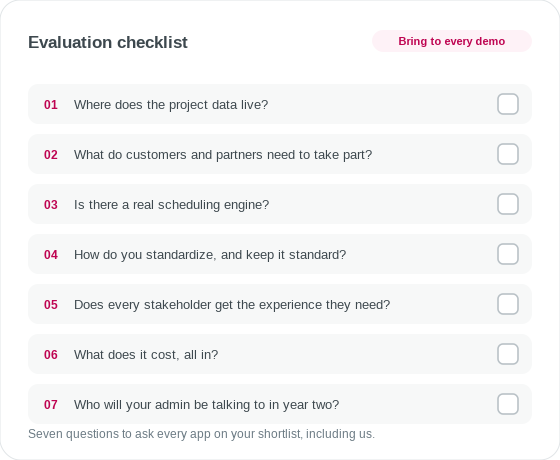
Illustration: an evaluation checklist with seven questions to ask every Salesforce project management app
THE SEVEN QUESTIONS

The label covers very different designs

Several apps on the AppExchange describe themselves as Salesforce-native. Here are the seven questions that separate them, and how Inspire Planner answers each one.

Where does the project data live, and who owns it?

WHAT TO ASK Native should mean the project, task, assignment and time records are Salesforce objects in your org, governed by your sharing rules, reportable with your reports and dashboards, and yours if you ever leave. Ask for the object model. Ask what happens to the data when the subscription ends.
INSPIRE PLANNER A managed package. Projects, tasks, resources, time entries, risks and portfolios are objects in your org. Standard Salesforce reports, dashboards, Flow and Apex work on them. Project data lives in your org. Inspire Planner - External Portal 2.0 is hosted by Inspire Planner and serves what you share; the security FAQ sets out exactly what it stores. What Salesforce-native means for us ›

What does a customer, partner or contractor need to participate?

WHAT TO ASK This is where apps differ most. Ask whether external users need an Experience Cloud site, a Salesforce license, an app license, or all three, and who builds and maintains the site. Then ask what each external user sees: the project schedule, or only a task list.
INSPIRE PLANNER External Portal is included in the platform. External Collaborators need no Salesforce license and carry no per-user Inspire Planner fee. They see their tasks and the project schedule and update their own work. If you already run an Experience Cloud site and want Inspire Planner inside it, the Experience Cloud license is available with Premium+. We keep the two apart so you can see what each one needs.

Is there a real scheduling engine?

WHAT TO ASK A project plan is only useful if dates move when work changes. Ask whether dependencies, constraints, calendars and non-working days reschedule the plan, or whether dates are fields someone updates by hand. Ask whether the schedule can be recalculated by automation, not only by a person in the Gantt.
INSPIRE PLANNER The Project Gantt is powered by the Gantt Scheduler - dependencies, baselines, critical path, calendars and non-working days, included for every customer. Advanced Scheduling Automation, coming to Premium+ and now in Private BETA with selected customers, will let Flow and Apex reschedule projects without anyone opening the Project Gantt.

How do you standardize - and keep projects standardized?

WHAT TO ASK Templates are table stakes. Ask how templates are built from what you sold (the products on an Opportunity), how versions are managed, and what happens to projects already underway when the template improves.
INSPIRE PLANNER Project templates, Template Stitching to build a project from the Products on an Opportunity, and Template Console for your template library and versions (New in 2.0: Available - Opt-in from the November 2026 Major Release). Advanced Template Management, coming to Premium+ and now in Private BETA with selected customers, keeps live projects aligned with updated templates.

Does every stakeholder get the experience they need?

WHAT TO ASK A PM lives in the plan. A team member should not have to. An executive wants one view of what needs attention. Ask what each role sees, and whether they all pay the same.
INSPIRE PLANNER Project Gantt for project managers, Task Console for team members (your work, across every project), Project Dashboard and Portfolio Dashboard for PMOs and leadership, External Portal for clients and partners. Role-based licenses to match: Standard for people who build or change the plan, Contributor for people who work it, Read-Only for people who need visibility.

What does it cost, all in?

WHAT TO ASK Ask whether features are gated by edition, what the minimum commitment is, and what external users cost.
INSPIRE PLANNER One platform with role-based licenses: Standard, Contributor and Read-Only. Scheduling, templates and External Portal are included for every customer; Premium+ adds Advanced Platform Enablement. Published list prices, starting at 10 Standard licenses. External Collaborators are included in the platform. See pricing ›

Who will your admin be talking to in year two?

WHAT TO ASK Ask about the release cadence, how new features arrive (switched off until you turn them on?), the support model, and whether the vendor’s own team runs onboarding.
INSPIRE PLANNER Three Major Releases a year with Maintenance Releases between them; new capabilities arrive as "Available - Opt-in" so you choose when to turn them on; Standard Onboarding is a structured 6-8 week plan run by the Inspire Planner team; 4.95/5 from 175+ reviews on AppExchange.

A demo shows day one.

The questions above are about the year after the demo. Bring them to every vendor, including us.

IN THEIR WORDS

"The best option we’ve seen"

What one PMO concluded after running its projects in Salesforce with Inspire Planner.

"If your org is using Salesforce … and needs a well-integrated PM tool, Inspire Planner is the best option we’ve seen."
Project Management Office Nordis Technologies Customer story, 2026
How Nordis Technologies' PMO moved every project into Salesforce ›

Questions about choosing an app

Does everything in Inspire Planner run inside Salesforce?

The core platform is a managed package in your org. Inspire Planner - External Portal 2.0 is hosted by Inspire Planner; the security and architecture FAQ explains where that data lives and how it is secured.

Do we need Experience Cloud?

No. External Collaborators don’t need a Salesforce license or an Experience Cloud site. The Experience Cloud license, available with Premium+, is for customers who want Inspire Planner inside an Experience Cloud site they already run.

Can we try it in a sandbox first?

Yes. Install the 30-day trial from AppExchange into a sandbox or your own org, or book a demo on a project like yours, in Salesforce.

Put our answers to the test.

We will walk through all seven questions on a project like yours, in Salesforce.