
Salesforce-native project management
Project execution, built for Salesforce.
Salesforce holds your customer and business context. Inspire Planner keeps project delivery connected to it, instead of adding another disconnected system.












Delivery happens somewhere else
When projects run in a separate tool, the customer record and the delivery plan drift apart. Teams execute in one system, executives rely on reports someone assembled, and customers collaborate by email and spreadsheet. Every integration you build to close the gap is one more thing your admin keeps alive.
From the account to the time entry, one data model
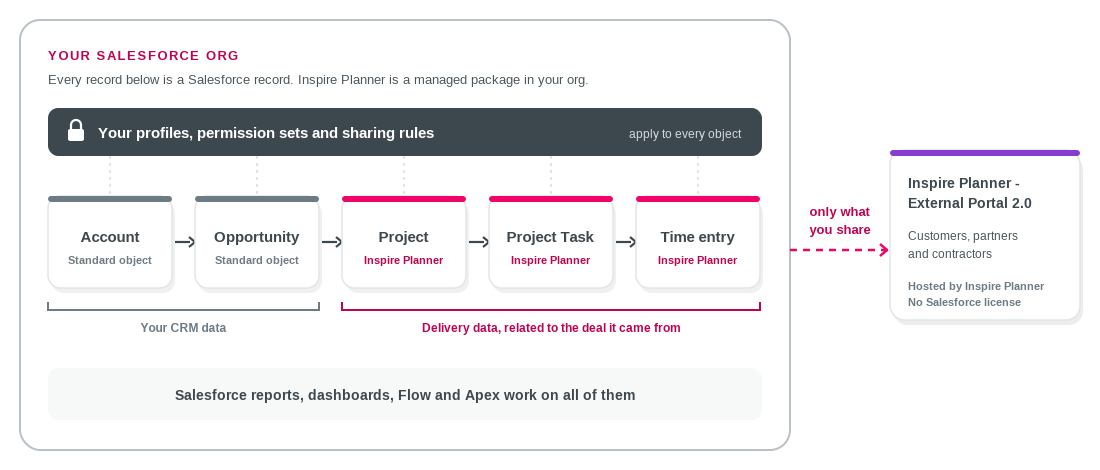
The core Inspire Planner platform is a managed package built on Salesforce. Projects, tasks and time entries are Salesforce records, related to the accounts and opportunities they belong to, and your Salesforce org's settings apply to them in Salesforce.
Configure it the Salesforce way
Every company runs projects a little differently. Inspire Planner works out of the box, and your admins shape it to fit with the tools they already know.
Want help building it? Configuration & Customization (we build it) and Consultation & Guidance (your partner or admin builds, we guide) are available as add-ons to Standard Onboarding.
What runs in your org, and what does not
We say "Salesforce-native" because the core platform is built on Salesforce. We are also precise about what runs outside it: Inspire Planner - External Portal 2.0 is an experience hosted by Inspire Planner, so your customers and partners can take part without a Salesforce license. The security and architecture FAQ explains where that data lives and how it is secured.
"Inspire Planner is a … Salesforce project management app with strong Gantt, dependency, and resource management features. It enables structured project execution directly within Salesforce …"
Questions about Salesforce-native
Is Inspire Planner on the AppExchange?
Yes. Inspire Planner is a managed package distributed on the AppExchange, rated 4.95/5 from 175+ reviews. You can start a 30-day free trial from the listing.
Does all our data stay in Salesforce?
Project data created in Inspire Planner is stored in your Salesforce org. Inspire Planner - External Portal 2.0 is hosted by Inspire Planner and lets external users work in the projects and tasks you share with them; the security and architecture FAQ covers the detail.
Which Salesforce editions are supported?
Professional Edition with API access and every edition above it, including Enterprise, Unlimited and Performance. Every Inspire Planner license works with Salesforce Platform Starter as the minimum user license.
Do we need developers to set it up?
No. Your Salesforce admin configures it with permission sets, page layouts and Flow. Standard Onboarding sets up the Admin foundation with them.
How do we compare Salesforce project management apps?
Several apps call themselves Salesforce-native, and the label covers very different designs. Our evaluation guide sets out seven questions to ask every vendor, including us: where the data lives, what external users need, and who your admin talks to in year two.
See it running in Salesforce.
A walkthrough on a project like yours, in Salesforce.