
Project ManagersPMO & Executives New in 2.0 Available - Opt-in from the November 2026 Major Release

Template Console: your Salesforce project template library

Your template library, with versions.

Create and manage your project templates and their versions, so every project starts from the way you deliver best. Templates live in your org, next to the Opportunities that start the projects.
4.95/5 from 175+ reviews on AppExchange
Part of Templates & Standardization ›
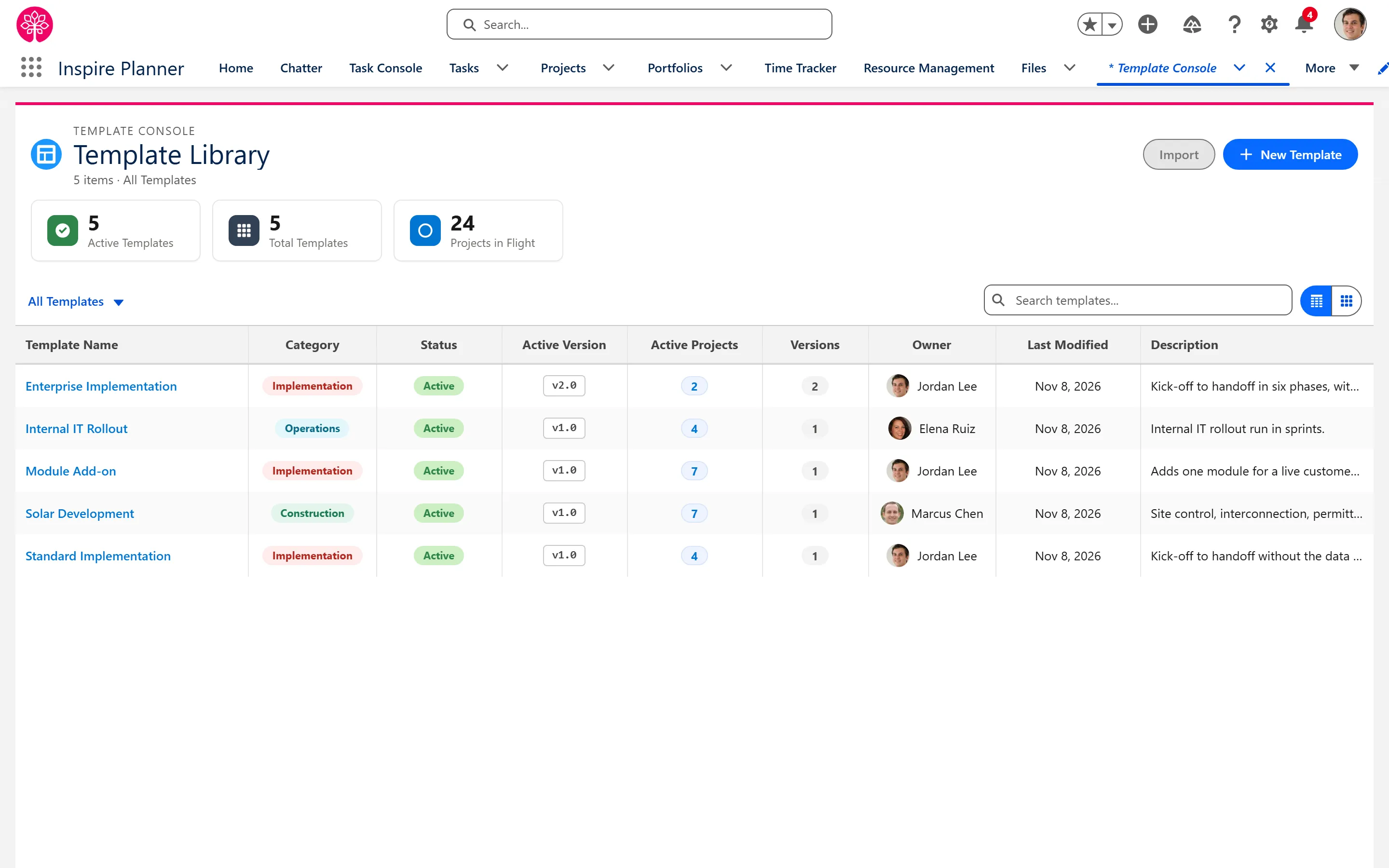
Template Console's Template Library for Brightline Systems: five active project templates with their category, active version, active projects, number of versions and owner. Enterprise Implementation is on v2.0 and has two versions.
WHY IT MATTERS

Every project should start from your best version

When templates are scattered or out of date, every project manager starts differently. One library and one current version change that.
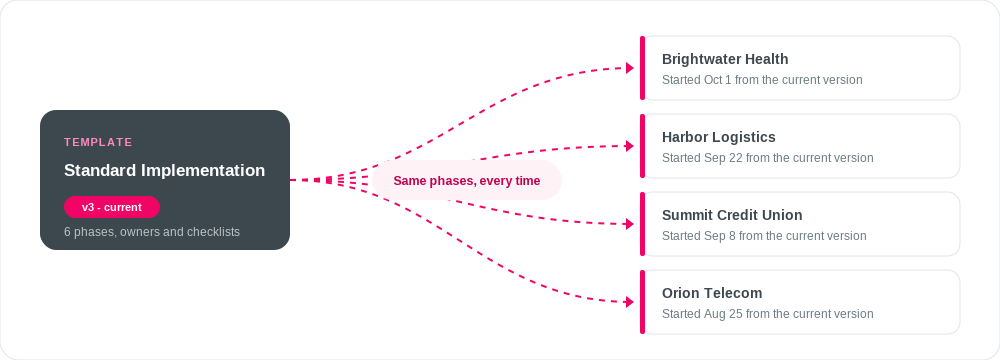
Diagram: one current template version builds four projects, each starting with the same phases
1 One current version Teams start from the version you mark as current, not from a copy in a shared drive.
2 The same phases every time Owners, checklists and dependencies come with the template, so quality does not depend on who runs the project.
3 A record of what built each project Trace any project back to the templates that started it.
WHAT YOU GET

Improve the template. Keep the history.
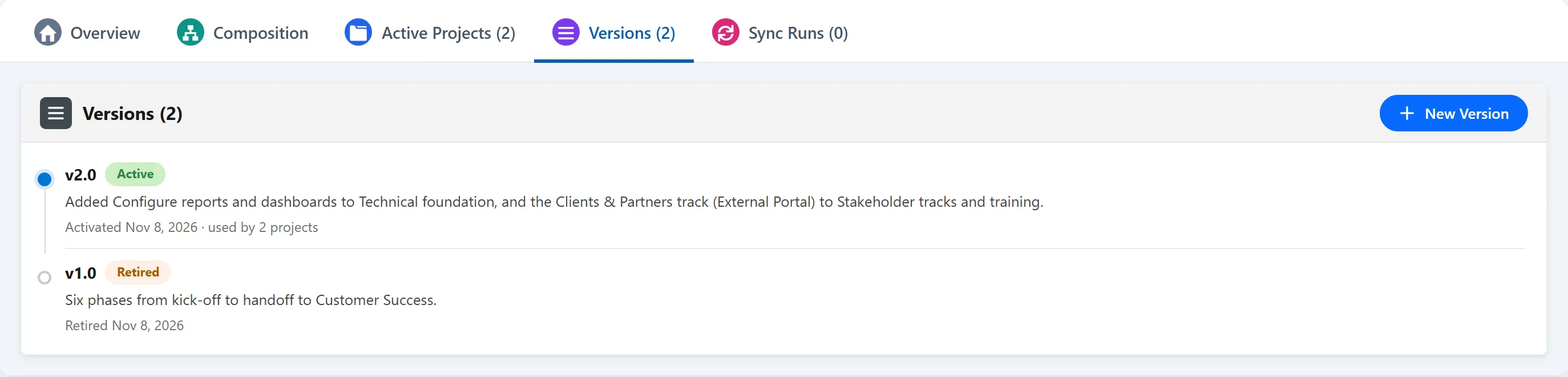
Versions tab of the Enterprise Implementation template: v2.0 Active, with a note that it added Configure reports and dashboards and the Clients & Partners track, used by 2 projects; v1.0 Retired, with its note.
1 The current version Mark the version teams start from.
2 New versions Improve the template in a new version without touching the one teams use today.
3 Version notes Write a version note on what your team changed, so everyone knows why the new version exists.
4 Template Import History Records which templates built each project.
Apply templates your way Create from a template, or insert several into one project with Multi-Template Insert.
TEMPLATE IMPORT HISTORY

Know which template built which project

Template Import History records which templates built each project, so you can trace delivery back to the standard you set.

Which templates built each project Recorded on the project, in Salesforce

Template Import History for the Brightwater Health - Rollout project: one entry showing the Enterprise Implementation template imported on September 24, 2026, with what the import included (change requests, files, notes, other custom objects).
Start from a template or the deal. Create, clone or import projects, insert several templates, or use Template Stitching to build a project from the Products on an Opportunity. See Templates & Standardization ›
HOW IT CONNECTS

Where every project starts

Projects built from your templates open in the Project Gantt, ready for the team, and run through the rest of the platform from there.

"… project templates, Gantt charts, task dependencies, milestone tracking … have helped standardize how we execute projects across the organization."
Charles Goodman Real Radiology Rated 5 out of 5.   AppExchange review, Aug 2026
Standard for project managers and template owners Contributor to view templates See pricing ›
Coming to Premium+ Advanced Template Management - keep live projects aligned with updated templates. Now in Private BETA with selected customers.
Learn about Premium+ ›

Questions about Template Console

Is Template Console included?

Yes. Template Console is part of the platform for every customer: Available - Opt-in from the November 2026 Major Release.

Does Template Console update projects already underway?

No. Templates standardize how new projects start. Keeping live projects aligned with updated templates is Advanced Template Management, coming to Premium+ and now in Private BETA with selected customers.

Do we have to turn it on?

It arrives switched off. Turn it on when your team is ready; it is covered in onboarding.

Can one project use more than one template?

Yes. Multi-Template Insert combines several templates in one project.

How do we know which template built a project?

Open the project and check its Template Import History.

See your templates in Template Console.

We will show Template Console with a template library like yours.