
Team Members Connect teams around work and information

Collaboration & Sharing: project collaboration in Salesforce

Project collaboration that stays on the work

Project teams, sharing, Chatter, files and notifications keep the conversation with the work.
4.95/5 from 175+ reviews on AppExchange
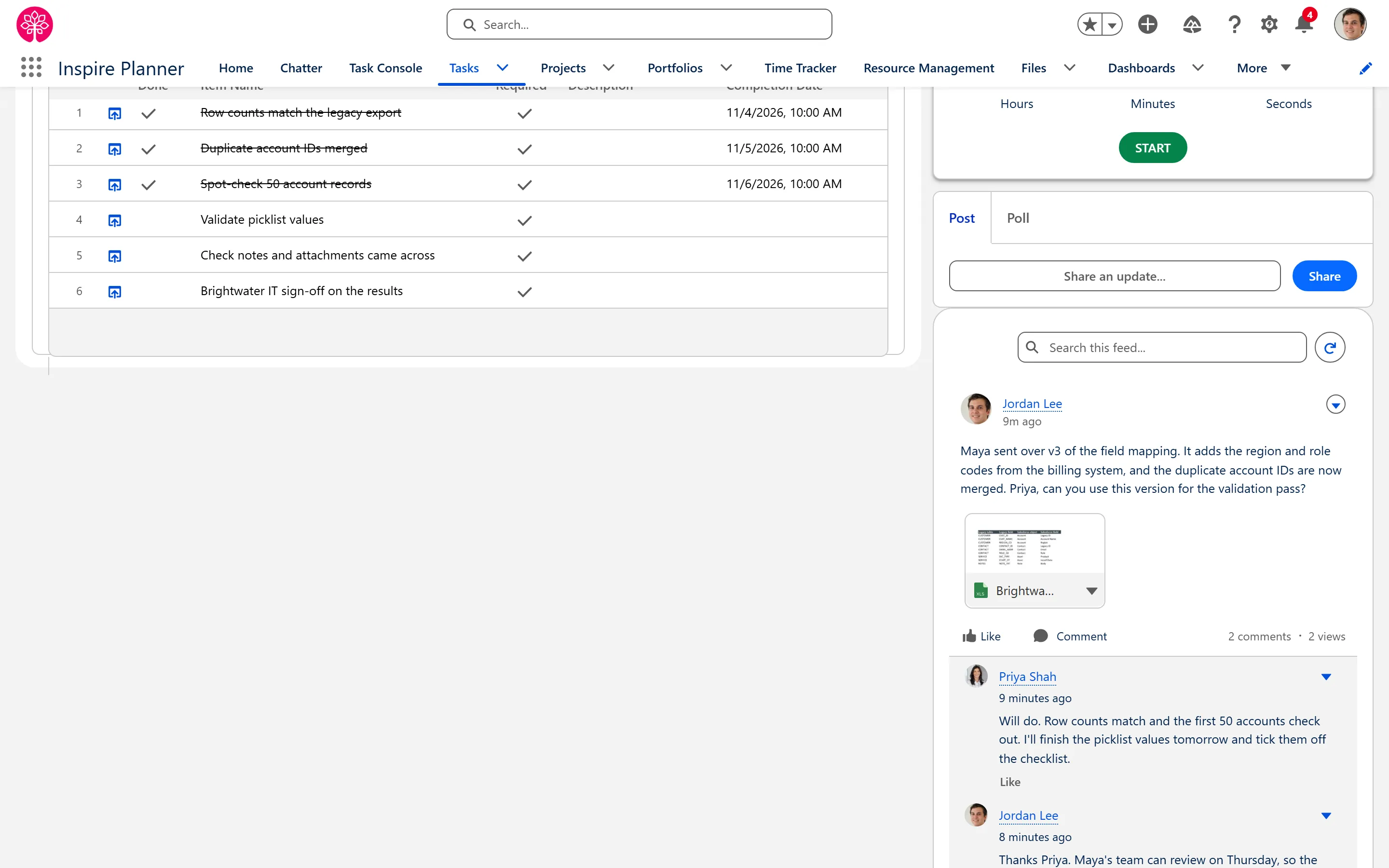
Task detail for Data validation on Brightwater Health - Rollout: a checklist with three of six items done, and a Chatter thread with the field mapping file attached and two replies.
WHY IT MATTERS

The conversation about the work should live with the work

When updates live in email and chat, the project loses its history. Collaboration & Sharing keeps it on the project.

01 Decisions buried in email The reasoning sits outside the project. With Inspire Planner: Chatter keeps the conversation on the project and the task.
02 Files in five places Files are scattered across inboxes and drives. With Inspire Planner: Files are attached to the work they belong to.
03 Changes that go unannounced People learn about them after the work has moved. With Inspire Planner: Notifications tell the right people when something changes.
04 Customers outside the loop Status sent by email. With Inspire Planner: Inspire Planner - External Portal 2.0 brings clients and partners into the project, with no Salesforce license.
WHAT'S INCLUDED

Inside Collaboration & Sharing

Five capabilities that keep the conversation on the work. Part of the platform for every customer.

Collaboration
Project Teams Define who works on each project.
Project Sharing Control who sees each project, using Salesforce sharing.
Chatter Conversations on projects and tasks.
Files Documents attached to the work.
Notifications Tell the right people when something changes.
INSIDE AND OUTSIDE

Chatter on the task, and the same task in External Portal

Your team talks on the task in Chatter, with files and notifications attached. Clients and partners see and update their own tasks in Inspire Planner - External Portal 2.0.
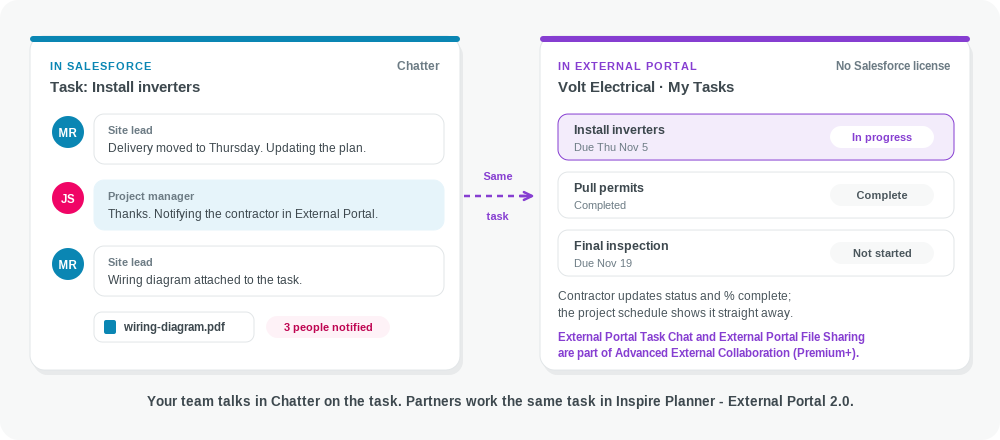
Side by side: a task in Salesforce with a Chatter conversation, an attached file and notifications, and the same task in Inspire Planner - External Portal 2.0, where a contractor without a Salesforce license sees and updates their tasks.
Inspire Planner - External Portal 2.0 brings customers, partners and contractors into the project. External Collaborators need no Salesforce license. Explore External Portal ›
WHO USES IT

Who uses Collaboration & Sharing

Each role maps to a license type. See license types and pricing ›

Where you’ll find it Related Product Areas
Everyone on the project Comment, share files, get notified Any license
Project managers Build the project team Standard
Salesforce admins Set project sharing Standard with admin permissions
"…the external project portal has been a complete paradigm shift in how we can communicate with and manage our external partners. … The contractor now has the ability to provide task-specific feedback via chatter, allowing specific task information to live (forever) in the project schedules."
Sean Draper King Energy Rated 5 out of 5.   AppExchange review, Sep 2026

Collaboration questions

Can customers join the conversation?

Customers see and update their own tasks in Inspire Planner - External Portal 2.0, with no Salesforce license. External Portal Task Chat and External Portal File Sharing are part of Advanced External Collaboration (Premium+).

Does sharing follow our Salesforce rules?

Yes. Project Sharing uses your Salesforce sharing model, so who sees a project follows the same rules as the rest of your org.

Does commenting need a Standard license?

No. Everyone on the project can comment, share files and get notified, on any license.

Where do files live?

On the project or task they belong to, so the latest version sits next to the work instead of in an inbox.

See your team and partners on one task.

Chatter inside, External Portal outside, on a project like yours.