
Team Members A practical environment to execute work across projects

Task Management & Execution: every task in Salesforce

Every task, across every project, worked in one place

Team members see every task from every project in one Task Console, with assignment, checklists and status rules that keep progress current. Agile boards and Task Lists are there when a project needs them.
4.95/5 from 175+ reviews on AppExchange
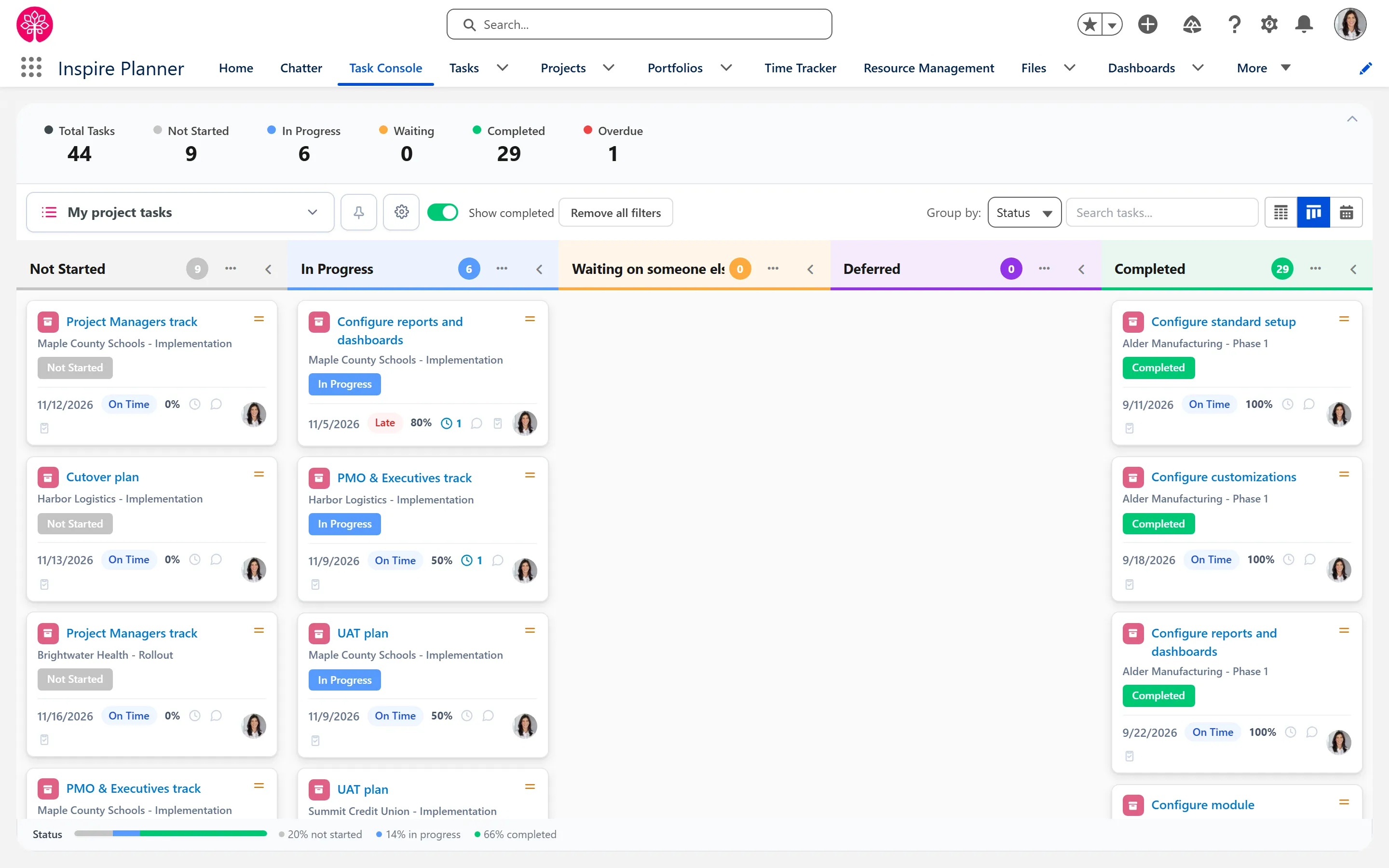
Task Console Kanban for Priya Shah: her tasks from five projects as cards in Not Started, In Progress, Waiting, Deferred and Completed columns, with due dates and task health.
One list across every project
WHY IT MATTERS

Work gets done in tasks, not in plans

Team members need one place to see their work and simple rules that keep status current. Task Management & Execution gives them both, whatever kind of project they are on.

WITHOUT IT WITH INSPIRE PLANNER
Status chased by email Updates live in inboxes. Team members update status in the Task Console, where they already work.
Different tools for different work Agile in one place, projects in another. Agile boards, Task Lists and structured projects run on one platform.
Manual status updates Progress depends on someone remembering. Task Status & Progress Rules keep progress current.
WHAT'S INCLUDED

Inside Task Management & Execution

One Task Console, with assignment and status rules, across Waterfall projects, Agile projects and task lists. Part of the platform for every customer.

One Task Console

Task Console Grid Every assigned task across projects, sortable and filterable.
Task Console Kanban The same tasks on a board.
Task Console Calendar The same tasks on a calendar.
Task Console Summaries & Indicators Summaries and indicators across your work.
Task Console Configuration Your admin sets it up for each team.

Agile projects and task lists

Agile Board, Backlog and Sprint Management Run iterative work with a board, a backlog and sprints.
Kanban Settings Set up the board for how your team works.
Task List Projects Simple lists for work that doesn't need a schedule.
Task Checklists Steps inside a task, checked off as you go.
Salesforce Task View Related Salesforce tasks alongside project work.
Task Appointment Scheduler Schedule appointments for tasks. Available - Opt-in.

Assignment and rules

Task Assignment Assign people to tasks.
Auto Assignment Assign work automatically, set up by your admin.
Assignment Completion Rules Decide what completes an assignment.
Task Status & Progress Rules Keep status and progress consistent without chasing.
TWO WAYS TO RUN WORK

One list of work, whichever way a project runs

Product and internal teams run sprints; delivery teams run scheduled projects. Team members don't have to care which: their tasks land in the Task Console either way.
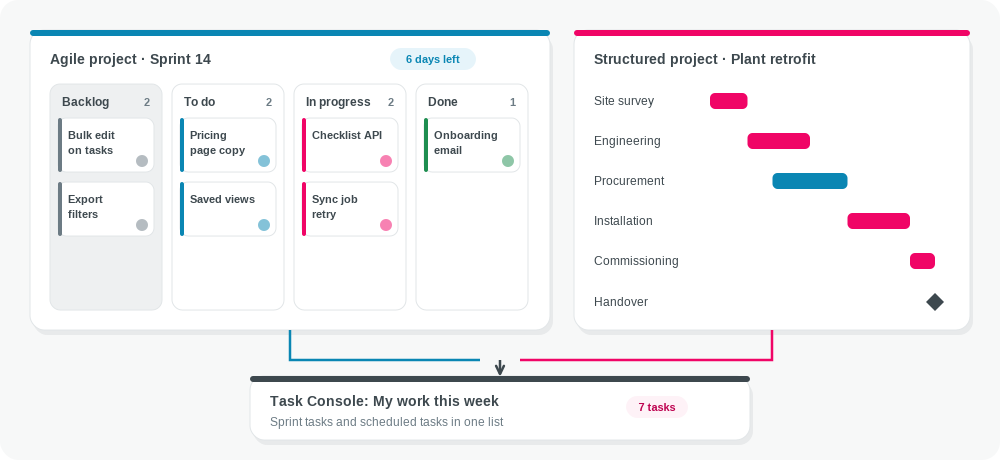
An Agile project board for Sprint 14 with Backlog, To do, In progress and Done lanes, next to a structured project shown as a Gantt chart. Tasks from both appear together in the Task Console.
WHO USES IT

Who uses Task Management & Execution

Each role maps to a license type. See license types and pricing ›

Where you’ll find it Related Product Areas
Team members Work and update their own tasks Contributor
Project managers Assign work and set rules Standard
Salesforce admins Configure the Task Console and rules Standard with admin permissions

Task management questions

Do team members need a Standard license?

No. Team members who work the plan use a Contributor license: they update status, % complete, checklists and comments on their own tasks.

When should we use a Task List Project?

For work that doesn't need a schedule. Task List Projects keep simple lists on the same platform, with no Gantt to maintain.

Can work be assigned automatically?

Yes. Auto Assignment, set up by your admin, assigns work for you, and Assignment Completion Rules decide what completes an assignment.

What does "Available - Opt-in" mean?

Supported and switched off by default, like the Task Appointment Scheduler. Your admin turns it on when your team is ready, and it is covered in onboarding.

Can we run Agile and structured projects together?

Yes. Agile Board, Backlog and Sprint Management run on the same platform as Gantt-scheduled projects, and tasks from both show up in the same Task Console.

See every task in one console.

Tasks from Waterfall and Agile projects, together in Salesforce.