
Inspire Planner vs standalone project management tools
Standalone project tools are good at managing work. When your customers, deals and accounts live in Salesforce, the question is where delivery should run. Here is what changes when it runs next to the customer record.
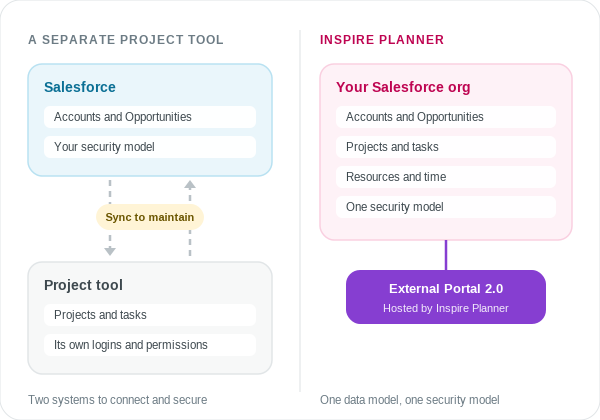
Delivery next to the customer, or in a separate system
Architecture comparison, reviewed October 2026. Excel, Microsoft Project and Smartsheet are trademarks of their respective owners.
Looking for a project tool that integrates with Salesforce?
You don’t need an integration if the project already lives in your org. Inspire Planner is a managed package: projects, tasks, resources and time entries are Salesforce objects, related to the accounts and opportunities they belong to. There is no connector to build, and nothing to keep in sync when either side changes.
Customer context travels with the project
When delivery runs in Salesforce, the account team sees delivery progress on the account, and the delivery team sees what was sold. Sales and delivery work from the same record.
"Inspire Planner is a … Salesforce project management app with strong Gantt, dependency, and resource management features. It enables structured project execution directly within Salesforce …"
When each one fits
Switching from a standalone tool
What the move looks like with the Inspire Planner team.
Questions about standalone tools
Do our team members need to work in Salesforce?
Yes. Team members need a Salesforce license, with Platform Starter as the minimum, and an Inspire Planner Contributor license. Clients, partners and contractors use Inspire Planner - External Portal 2.0 and need neither. Team members work their tasks in the Task Console, a focused view that does not require learning the rest of Salesforce.
Can Inspire Planner run Agile work too?
Yes. Structured delivery is the core, and the same platform runs Agile projects and Task Lists on the same data.
Can we connect Inspire Planner to other tools?
Yes. Projects and tasks are Salesforce records, so the APIs and integrations your org already uses can read and update them. No separate connector.
See delivery next to the customer.
We will show a project built from an Opportunity, in Salesforce.