
Last reviewed October 2026. We update this page with every Major Release. COMPARE

Inspire Planner vs spreadsheets and desktop project tools

Many teams start with a spreadsheet or a desktop scheduler. They work until the plan has to be shared, kept current and tied back to the customer. Here is what changes when the plan moves into Salesforce.
4.95/5 from 175+ reviews on AppExchange
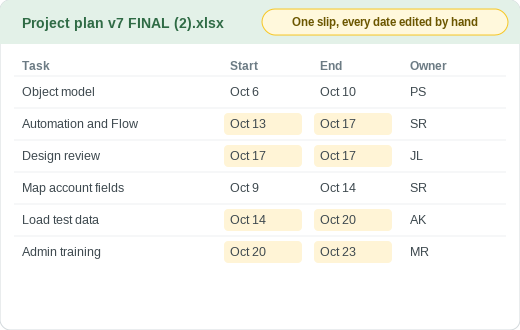
Illustration of a spreadsheet plan with dates edited by hand
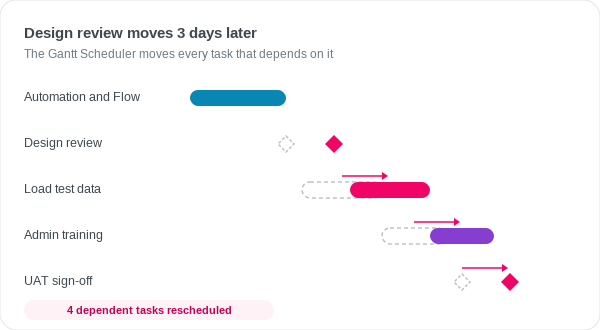
Illustration: moving one task reschedules the tasks that depend on it
SIDE BY SIDE

A project plan alternative that lives in Salesforce

Inspire Planner
Spreadsheets and desktop tools (Excel, Microsoft Project)
Where the plan lives
In your Salesforce org, related to the account and opportunity
In a file, on a drive or a desktop
Keeping it current
Team members update their own tasks in the Task Console
The project manager collects updates and edits the file
Scheduling
Dependencies recalculate in the Project Gantt; baselines track change
Depends on the tool; spreadsheets need manual date changes
Status for leadership
Project Dashboard and Portfolio Dashboard, live
A status report assembled by hand
Customers and partners
Inspire Planner - External Portal 2.0, without a Salesforce license
The plan is emailed as a file or PDF
Starting a project
From a template, or from the Products on the Opportunity
Copy last time's file
Security
Your Salesforce profiles, permission sets and sharing rules
Whoever has the file
Who needs a license
Team members: a Salesforce Platform Starter license (or higher) and a Contributor license. Executives: Read-Only. External Collaborators: neither.
Excel: anyone with the file. Microsoft Project desktop: a Project license for each person who edits the plan.

Architecture comparison, reviewed October 2026. Excel and Microsoft Project are trademarks of their respective owners.

IN THEIR WORDS

"Something better than shaded cells"

Teams moving from spreadsheets often want the structure of a desktop scheduler without its weight.

"Inspire Planner provides the perfect balance of features that allow our users to quickly create comprehensive project plans with ease. … We highly recommend the tool … for those who have struggled to implement more cumbersome enterprise software applications and want something better than shaded cells in an excel sheet."
Eric Werner Director of Autonomous Vehicle Programs, US Ignite Rated 5 out of 5.   AppExchange review, Apr 2026
FAIR TO BOTH

When each one fits

Move to Inspire Planner when More than one person updates the plan Customers or partners need to see progress Leadership asks for status across projects Projects start from a deal in Salesforce
A file may still be enough when One person owns a short, simple plan The plan does not need to be shared outside the team Your company does not use Salesforce
MOVING OVER

Bring your plan with you

We set up your first templates with you and train your admins to build and maintain them. Need them built for you? Configuration & Customization hours cover it. Your admins and power users learn the Project Gantt and Task Console in live sessions.

Map your delivery model We set up your first templates with you and train your admins to build and maintain them. Need them built for you? Configuration & Customization hours cover it.
Run a real project Your first project runs in Inspire Planner during onboarding.
Retire the file Status comes from the dashboards, not the spreadsheet.

Questions about moving from spreadsheets

Can we import an existing plan?

Yes. Save the plan from your spreadsheet or desktop scheduler as a CSV file, and the Project Import Wizard brings it into Inspire Planner, and onboarding can add Data Migration services when you are moving a larger body of work.

Do team members need training?

Your admins and power users get live training during onboarding, then bring the team along in the Task Console.

Is Inspire Planner as detailed as a desktop scheduler?

For structured delivery, yes. The Project Gantt, powered by the Gantt Scheduler, handles dependencies, baselines, critical path, calendars and non-working days. The difference: the plan is shared and current, not a file one person maintains.

See your plan in Inspire Planner.

We will show you a project like yours, in Salesforce.