
Inspire Planner security and architecture
Where your project data lives, and who can see it.
The core platform runs in your Salesforce org under your security model. Inspire Planner - External Portal 2.0 is hosted by Inspire Planner and only sees what you choose to share. This page explains both, plainly.
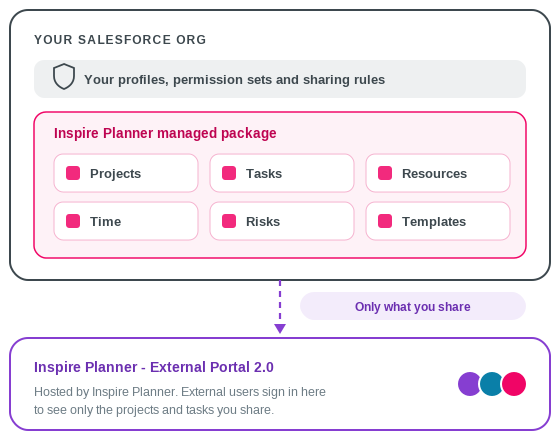
What runs where
Security reviews go faster when the architecture is clear. Inspire Planner has two parts, and they are governed differently: the managed package in your org, and External Portal, which Inspire Planner hosts.
The questions your security team will ask
External Portal is the hosted service your external users sign in to, and it keeps their accounts, so it is where most reviews focus. Here is the summary. Ask us for the detail your review needs.
What your Salesforce admin configures
Your admin decides who uses Inspire Planner and whether External Portal is turned on, and your team decides who is invited to it.
Security and architecture questions
Is Inspire Planner Salesforce-native?
The core platform is. It is a managed package built on Salesforce, and your project records are stored in your org. Inspire Planner also hosts External Portal 2.0, so people outside your org can take part without a Salesforce license.
Does project data leave our org?
Your project records are stored in your org. If your admin turns it on, External Portal reads the projects and tasks you share live from your Salesforce org and doesn't keep a copy of your project data. It stores only what it needs to run: user accounts, sessions, the org connection, feature settings and logs. Our security documentation sets out every flow between your org and the services Inspire Planner hosts.
Can external users see anything we have not shared?
No. External users see only the projects they are added to, and only the tasks and schedule you share with them.
What independent security testing does Inspire Planner have?
An independent security firm runs an external penetration test of our hosted systems every year, alongside the Salesforce AppExchange security review. The March 2026 test was retested in November 2026, and the retest confirmed all findings were fixed. We can share an executive summary under NDA.
Can we get your security documentation for a review?
Yes. Ask through the form below or your Inspire Planner representative. We can share our security policies, a data-flow summary, our Data Processing Agreement, and an executive summary of our latest penetration test under NDA.
Which Salesforce editions are supported?
Professional Edition with API access and every edition above it, including Enterprise, Unlimited and Performance.
Will an update change our org without warning?
No. We publish release notes two weeks before a Major Release reaches sandboxes and one week before a maintenance release, and releases reach sandboxes before production so you can test them first.
Get our security documentation
The documents IT, security, and procurement teams usually ask for. Tell us what your review needs, and we'll send what applies.
- Architecture: what runs in your org and what runs on the services we host
- Access and sign-in for your team, clients and our support team
- Our Data Processing Agreement and where your data is stored
- Testing, assurance and release control
Prefer to talk it through? Book a demo