Salesforce project management for every role and industry

The same project, seen from your seat.

Project managers plan and control. Teams execute. PMOs standardize and oversee. Executives see what needs attention. Customers and partners participate. All on the same project, connected to Salesforce.
4.95/5 from 175+ reviews on AppExchange
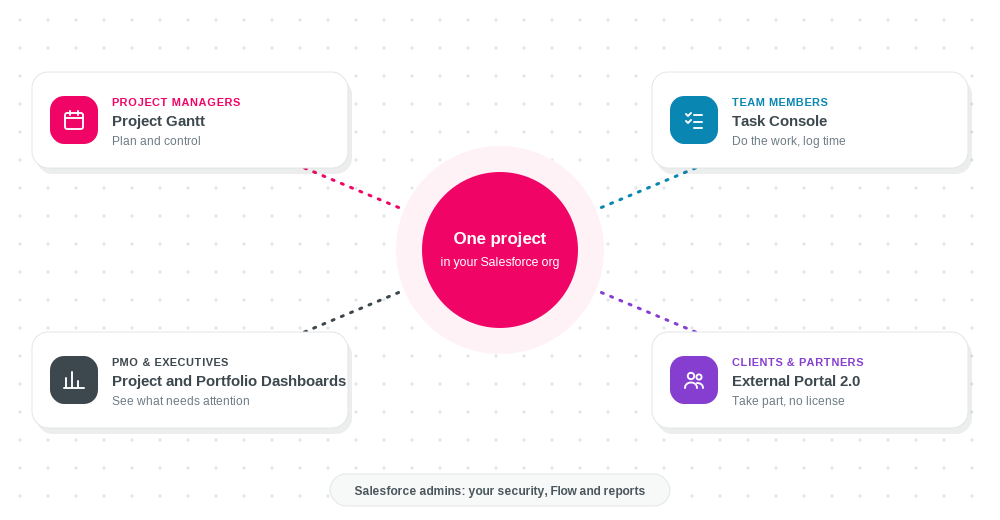
Diagram: one project in Salesforce at the centre, with project managers in the Project Gantt, team members in the Task Console, PMO and executives on the dashboards, and clients and partners in External Portal 2.0
Project Managers Plan, coordinate and control delivery

Realistic plans, and control as work changes

Build the plan in the Project Gantt, start it from a template or from the Products on an Opportunity, assign the work and keep it on track as dates move.
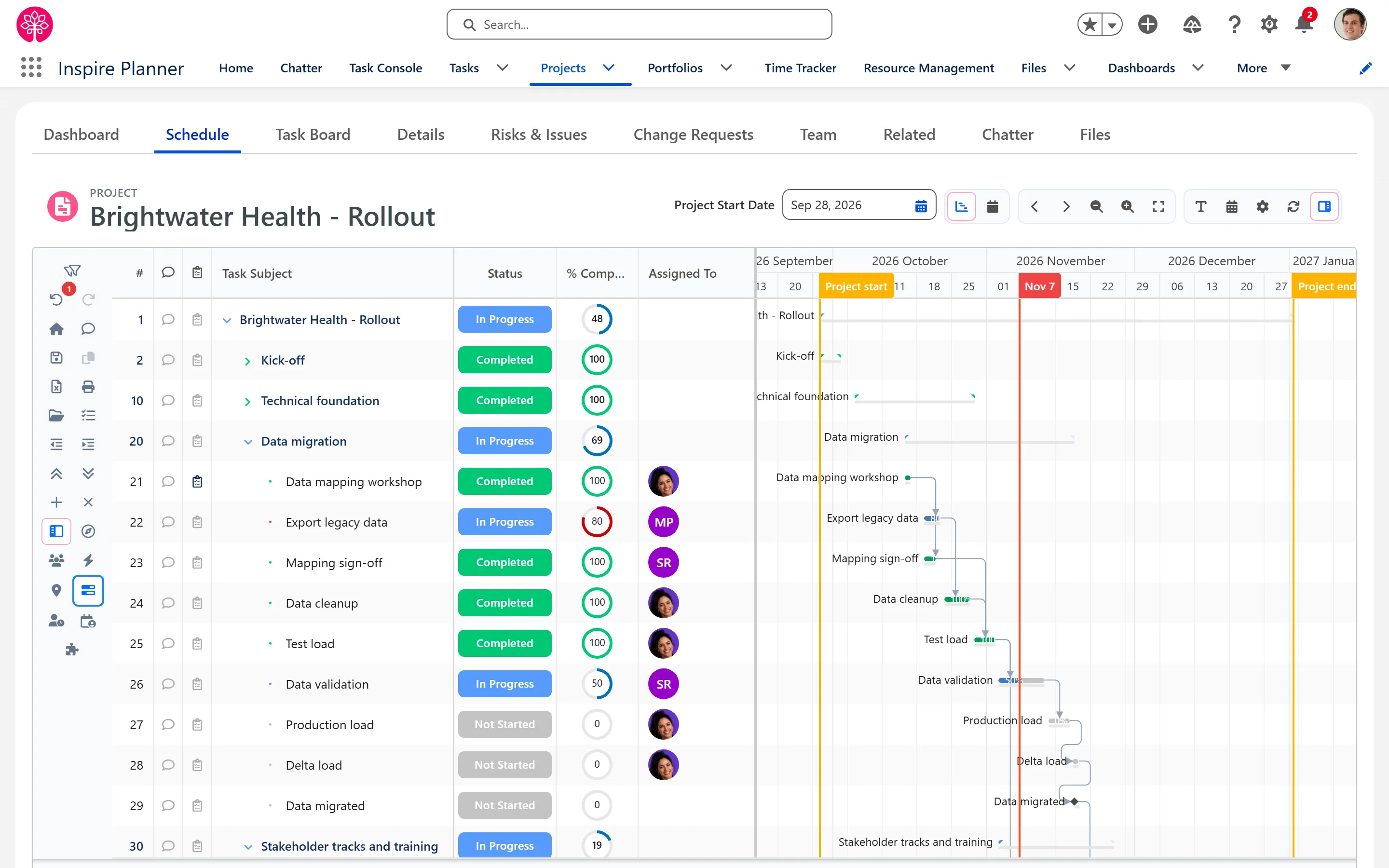
Project Gantt, powered by the Gantt Scheduler: dependencies, baselines, critical path Project templates and Template Stitching from the Opportunity Task assignment, risks and issues Project Dashboard: the status report is already there
License:Standard - for anyone who builds or changes the plan
Project Gantt for the Brightwater Health - Rollout project: phases and tasks with assigned team members, dependency lines, a milestone, baseline bars and today's date marked.
Project Gantt, powered by the Gantt Scheduler
Team Members Execute assigned work

Your work, across every project

A practical workspace for the tasks assigned to you, in Grid, Kanban and Calendar views, without opening the Project Gantt. Update status, work through checklists, log time and keep the conversation on the task.
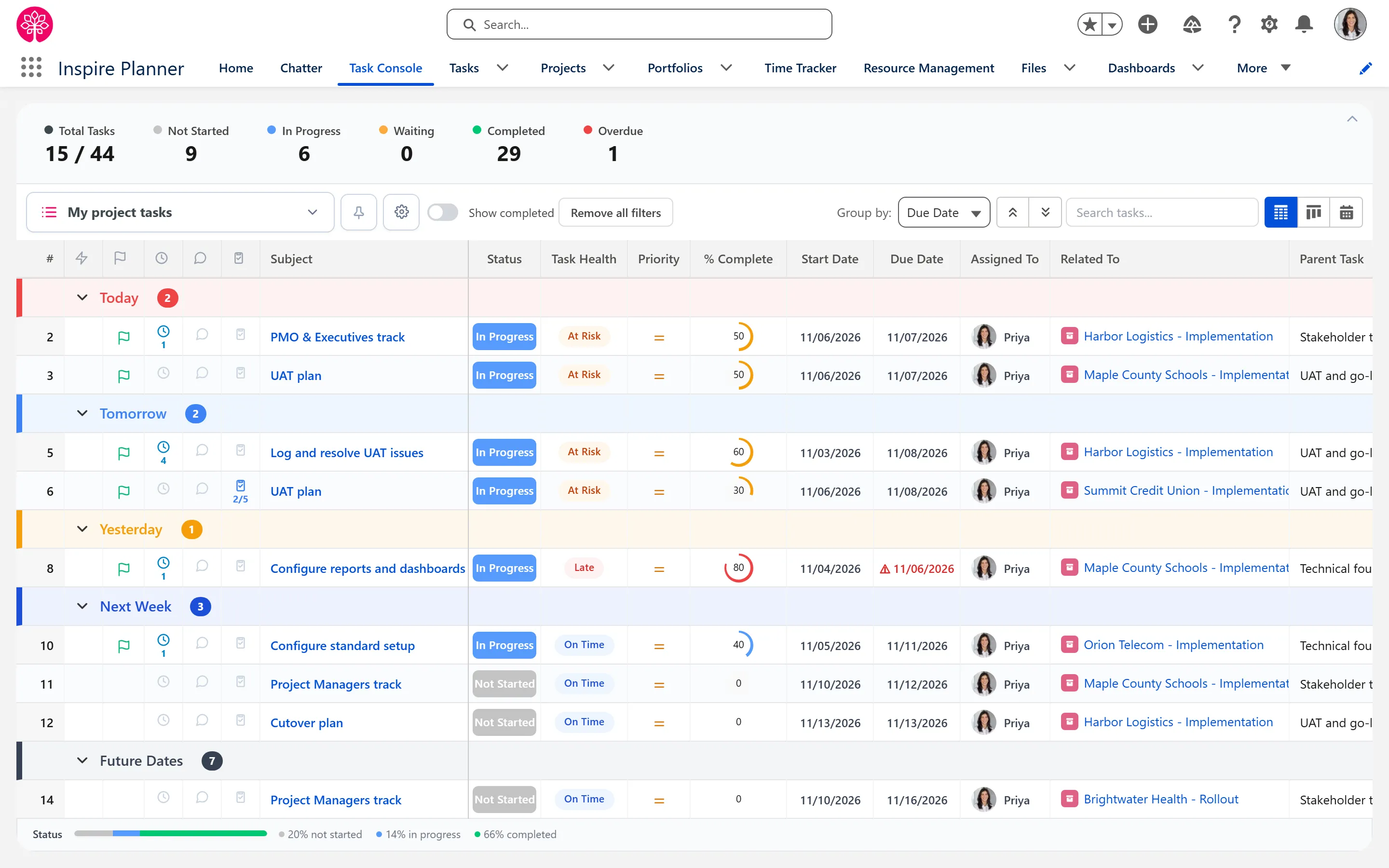
Task Console: grid, Kanban and calendar views Checklists and Chatter on every task Time tracking, vacation and PTO Health on every task: On Time, At Risk, Late
License:Contributor - for people who work the plan
Task Console grid for team member Priya Shah: open tasks from five projects grouped by due date, with status, task health, progress and ready-to-start flags.
Task Console - your work across every project
PMO & Executives Standardize, oversee and decide

Every project in your portfolio. One view of what needs attention.

PMOs standardize how projects run and see across all of them. Executives and sponsors get the answer without another status meeting.
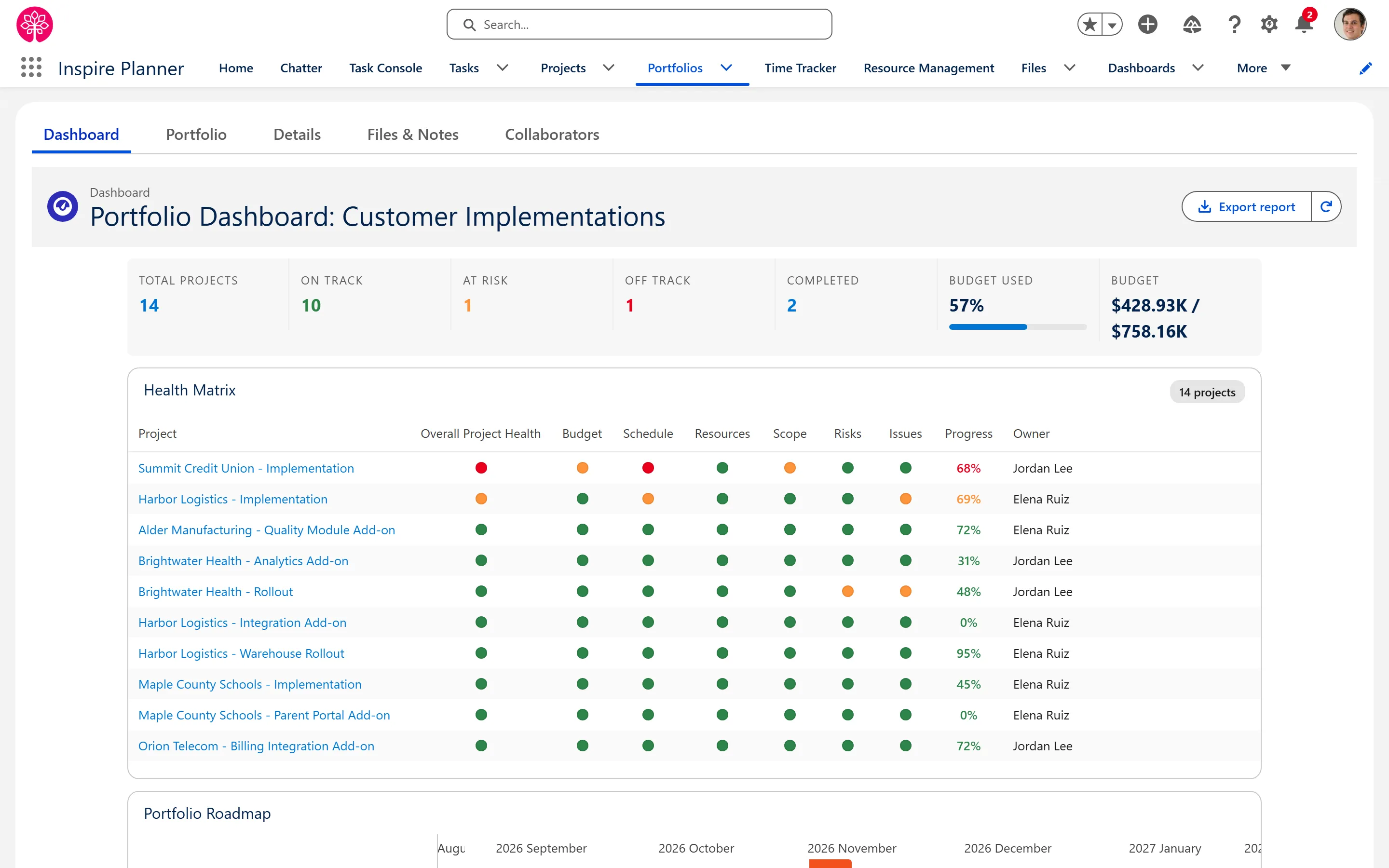
Portfolio Dashboard and Portfolios across every project Templates and governance for repeatable delivery Resource Management: allocation, utilization, skills and capacity Timesheet approval (Available - Opt-in) and budget visibility
License:Standard for PMO leads; Read-Only for executives and sponsors who need visibility
Portfolio Dashboard for the Customer Implementations portfolio: 14 projects by status, budget used, and a health matrix of schedule, budget, risks, issues and progress for each project.
Portfolio Dashboard - one view of what needs attention
Clients & Partners Participate without joining your org

Keep customers and partners connected to delivery, without another Salesforce license

Customers, partners and contractors open Inspire Planner - External Portal 2.0, see their work across every project, and update it.
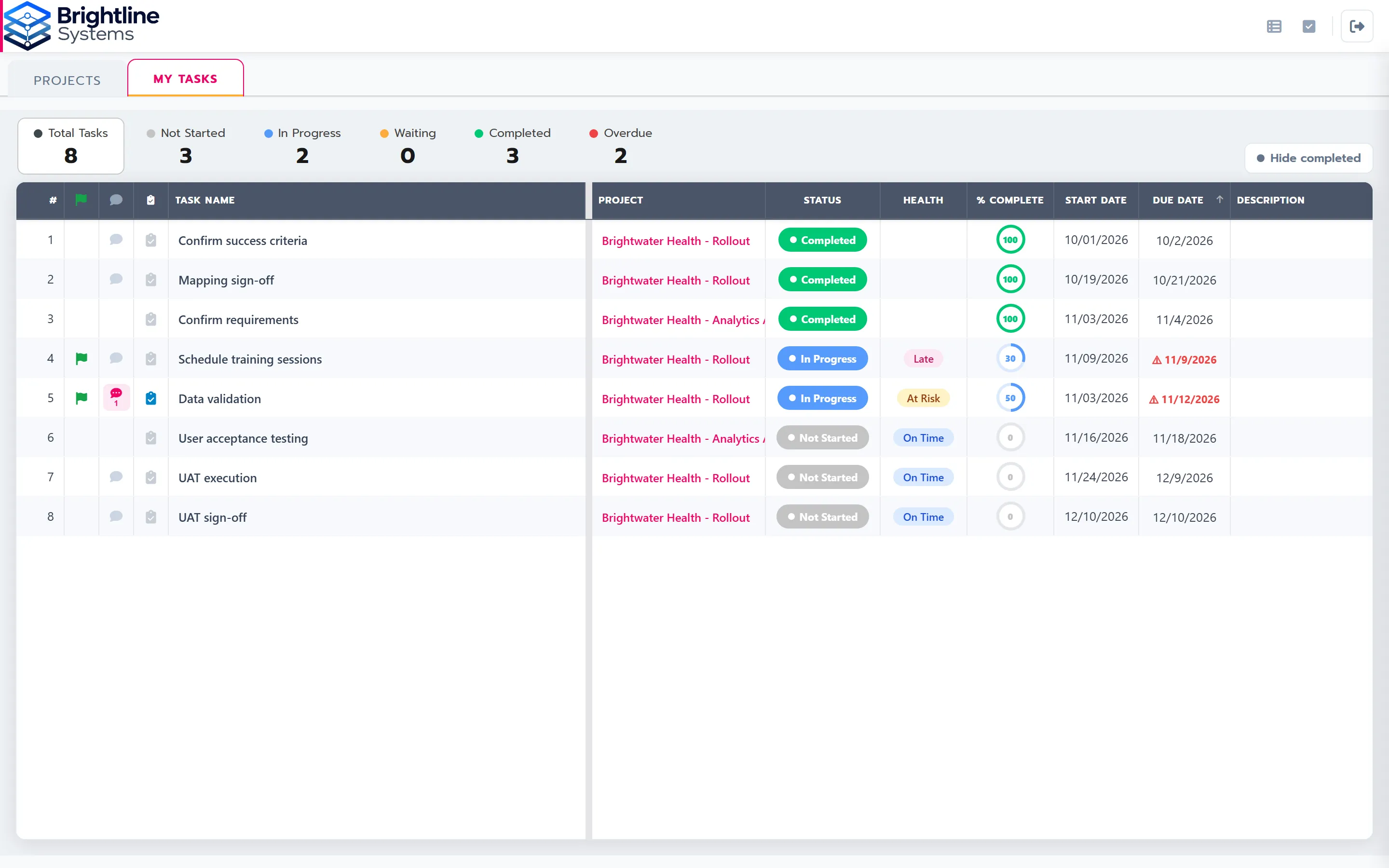
External Portal My Tasks across every project The project schedule they are part of Included in the platform, hosted by Inspire Planner Premium+ Advanced External Collaboration: External Portal Task Chat, External Portal File Sharing, External Portal Checklist Items, External Portal Custom Object Tabs, External Portal Login Branding
License:External Collaborators need no Salesforce license and no Inspire Planner license
The client's My Tasks in the External Portal: 8 tasks across the two Brightwater Health projects with totals (3 not started, 2 in progress, 3 completed, 2 overdue), each task's project, status, health, percent complete and dates.
Your client's view
Admin foundation - included in every onboarding

Fits your org the Salesforce way

A managed package on the AppExchange. Your admin configures it with the tools they already use, and every Admin foundation is set up with them during onboarding.

Your data model Projects, tasks, resources and time are Salesforce objects in your org.
Your security Permission sets, sharing rules and page layouts govern access.
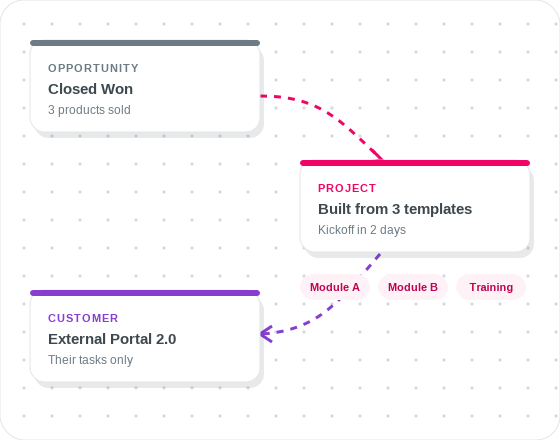
Your automation Flow and Apex work on project data; Template Stitching starts projects from Opportunities.
Your release control New capabilities arrive Available - Opt-in. You choose when to turn them on.
INDUSTRIES

Built for structured, repeatable delivery

Teams in these industries run many concurrent projects with customers, partners or contractors in the loop, and their business already lives in Salesforce.

ENERGY & RENEWABLES Multi-site programs with contractors on every task Developers, energy-services firms and utilities run many site projects at once from Salesforce, from development through commissioning. Contractors and partners own tasks on every one. Inspire Planner keeps the schedule, the resources and the external work in one place.
Portfolio of sitesContractors in External PortalResource capacityTemplates per project type
See Energy & Renewables ›
"It offers a simplified yet robust project management approach, providing all the key features required, even for less experienced teams … The support has been highly responsive …"
Kaoutar Louaraini ENGIE Renouvelables Rated 5 out of 5.   AppExchange review, May 2026
Also delivering in Salesforce: TelecommunicationsHospitalityFinancial services Talk to us about your industry ›

Questions about who it is for

Which license does each person need?

Anyone who builds or changes the plan uses Standard. Team members who work the plan use Contributor. Executives and sponsors who need visibility use Read-Only. Customers, partners and contractors use Inspire Planner - External Portal 2.0 and need neither a Salesforce license nor an Inspire Planner license. Team members also need a Salesforce license alongside Contributor; Platform Starter is the minimum.

Can we start with one team and add others?

Yes. Standard Onboarding sets up up to three stakeholder tracks, and you can add tracks as more teams come on.

Do we need a Salesforce admin?

Yes, Inspire Planner lives in your Salesforce org. Onboarding sets up the Admin foundation with your admin.

See it for your team.

A walkthrough built around your roles, your projects and your customers.