
Resource Management: Salesforce resource management for project teams
Resource management that shows who has room
See who is working on what, who has room, and who is overbooked, across every project, before the plan meets reality.
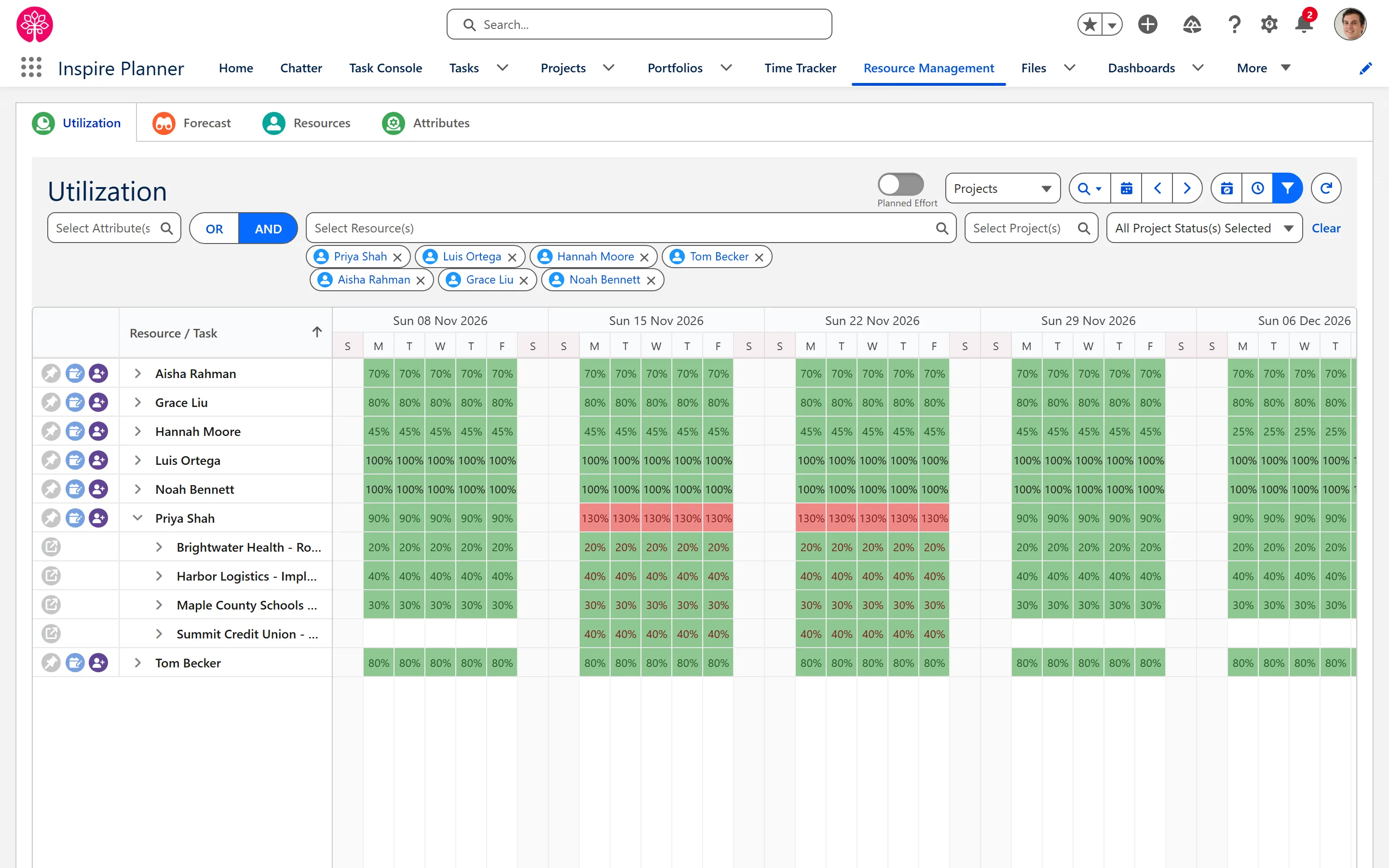
Allocation by person and week, before the plan meets reality
Allocation from every project lands in one view, so a resource manager spots the overbooked week while there is still time to move work.
A plan is only as real as the people behind it
Dates mean little if the same person is booked on three projects at once. Resource Management puts capacity next to the plan, so project managers and resource managers can see the conflict before it becomes a delay.
Inside Resource Management
Allocation, utilization, booking, calendars and skills. Part of the platform for every customer.
Who uses Resource Management
Each role maps to a license type. See license types and pricing ›
"The resource management capabilities are a strong advantage, enabling effective team allocation and planning."
Resource Management questions
Does Resource Management work across projects?
Yes. Allocation and utilization are shown across every project, so someone booked on three projects shows up once, with their full load.
Is this a staffing or PSA tool?
No. Resource Management shows capacity against your project plans; it doesn't replace a staffing or PSA tool.
Can we see allocation at portfolio level?
Yes. The Portfolio Dashboard includes resource allocation across the projects in a portfolio, next to health, budget and risks.
Can we match people to work by skill?
Yes. Resource Skills & Roles let you assign work by the skill or role it needs, not only by who is free.
Can we book people before the tasks are final?
Yes. Booking Tasks reserve time for people on the work ahead, so capacity is held before the detailed plan exists.
Do time off and working days count?
Yes. Resource Calendars & Availability are part of every allocation, and the Gantt Scheduler uses working days when it calculates dates.
See who has room across your projects.
Bring your busiest month. We'll show allocation by person and week, in Salesforce.