What's new in Inspire Planner 2.0

If you haven't looked at Inspire Planner recently, look again.

Inspire Planner 2.0 is a Salesforce-native Project Execution Platform: a modern experience for every stakeholder on a project, from the project manager planning it to the customer waiting on it.
4.95/5 from 175+ reviews on AppExchange
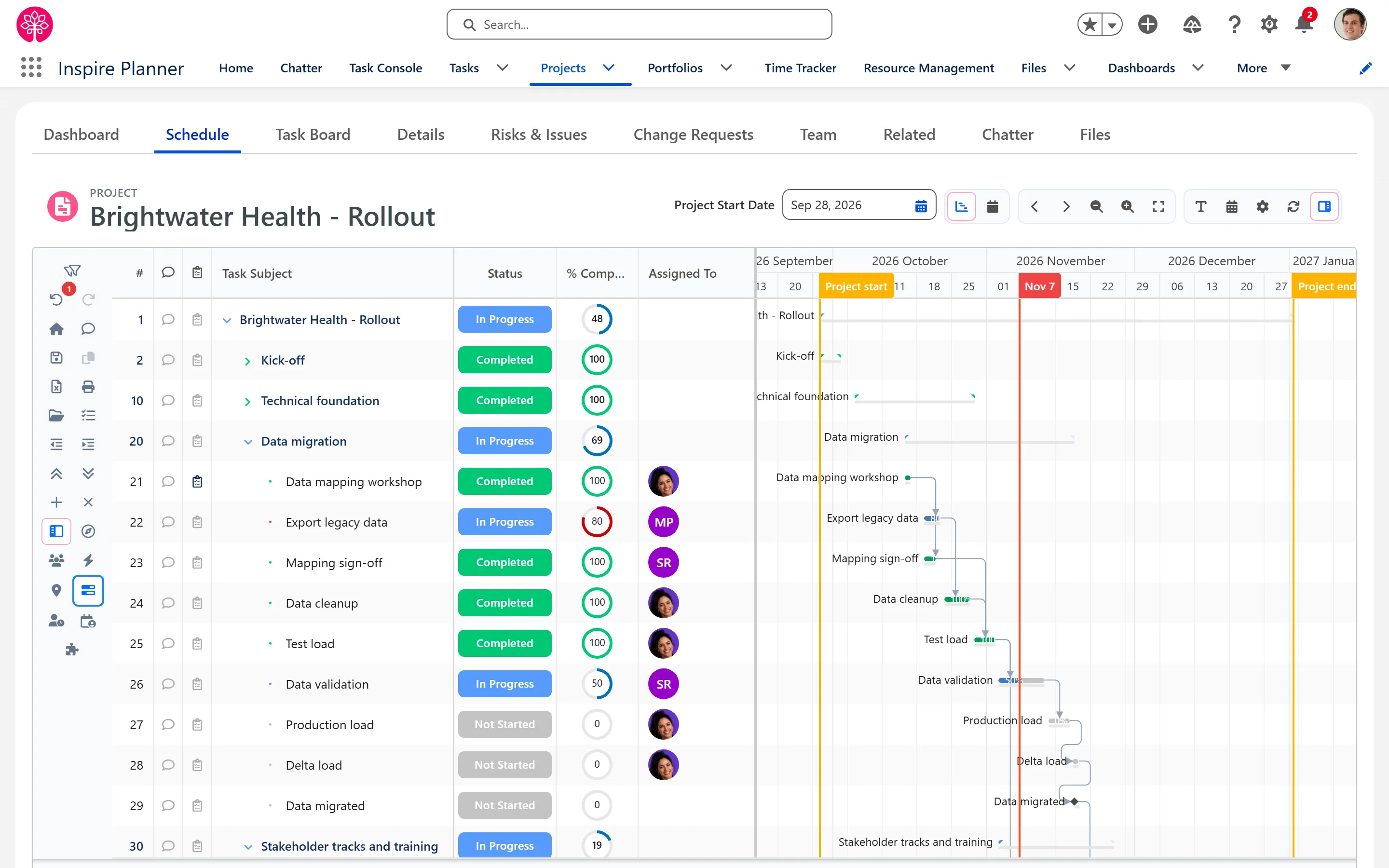
Project Gantt for the Brightwater Health - Rollout project: phases and tasks with assigned team members, dependency lines, a milestone, baseline bars and today's date marked.
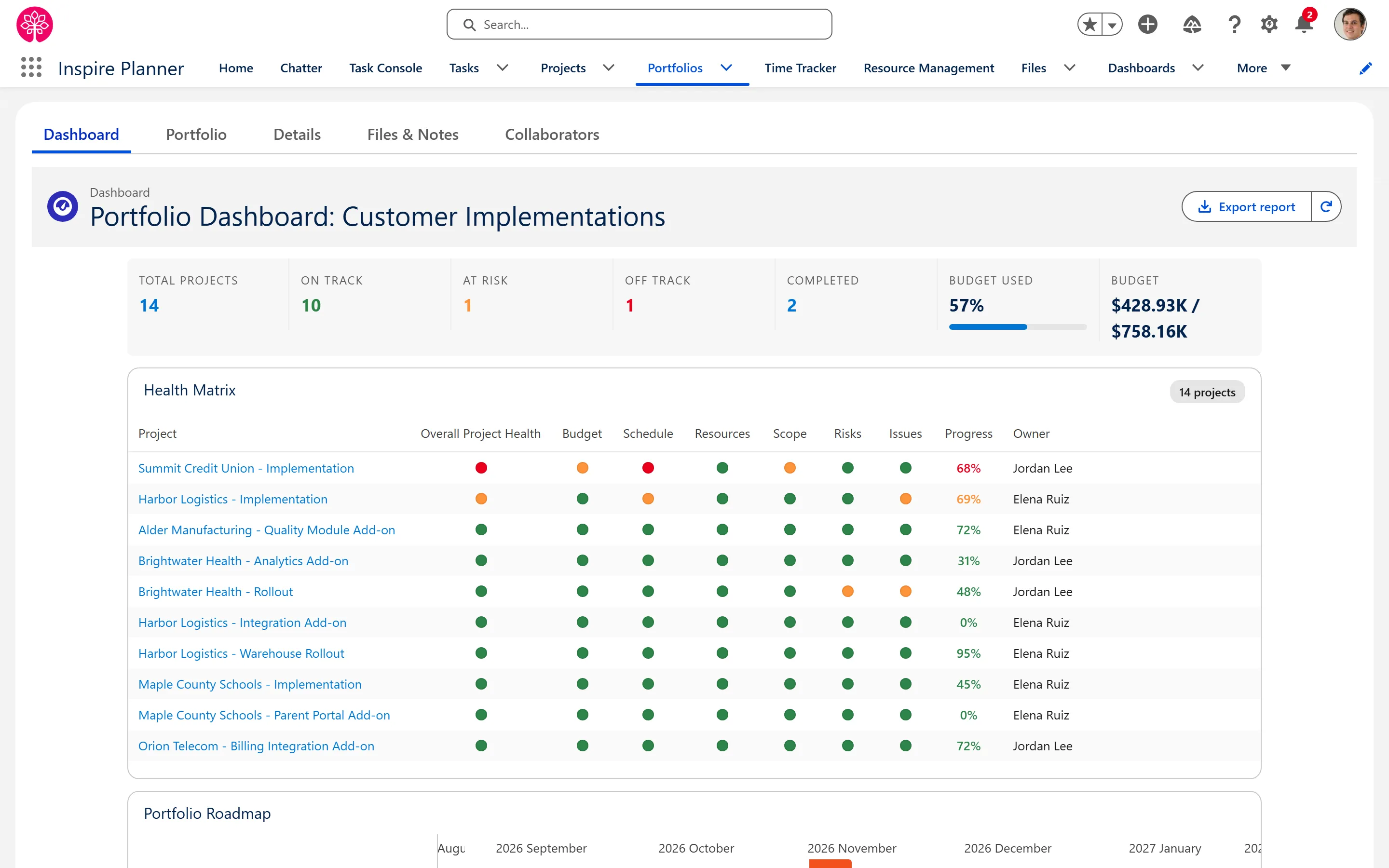
Portfolio Dashboard for the Customer Implementations portfolio: 14 projects by status, budget used, and a health matrix of schedule, budget, risks, issues and progress for each project.
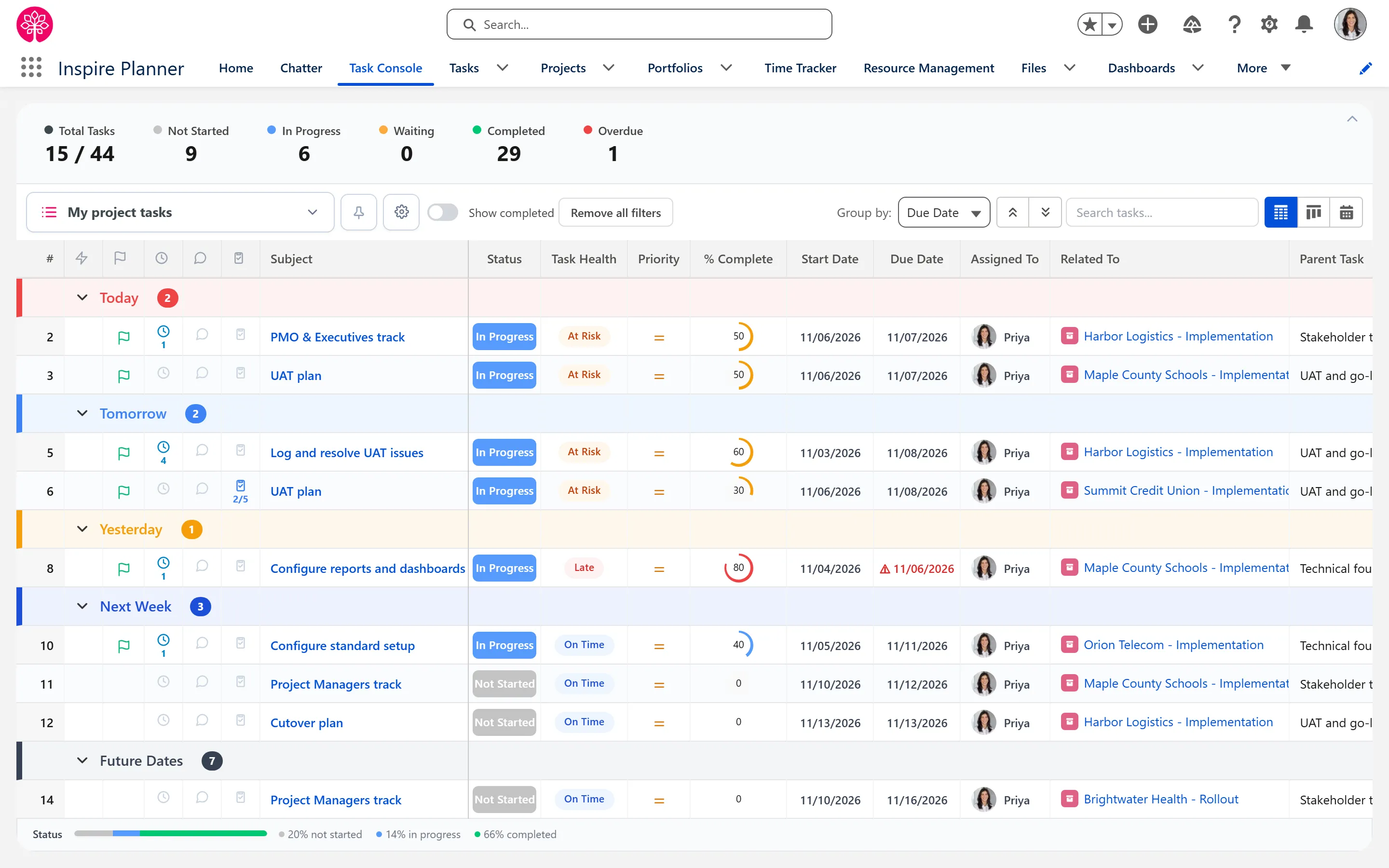
Task Console grid for team member Priya Shah: open tasks from five projects grouped by due date, with status, task health, progress and ready-to-start flags.
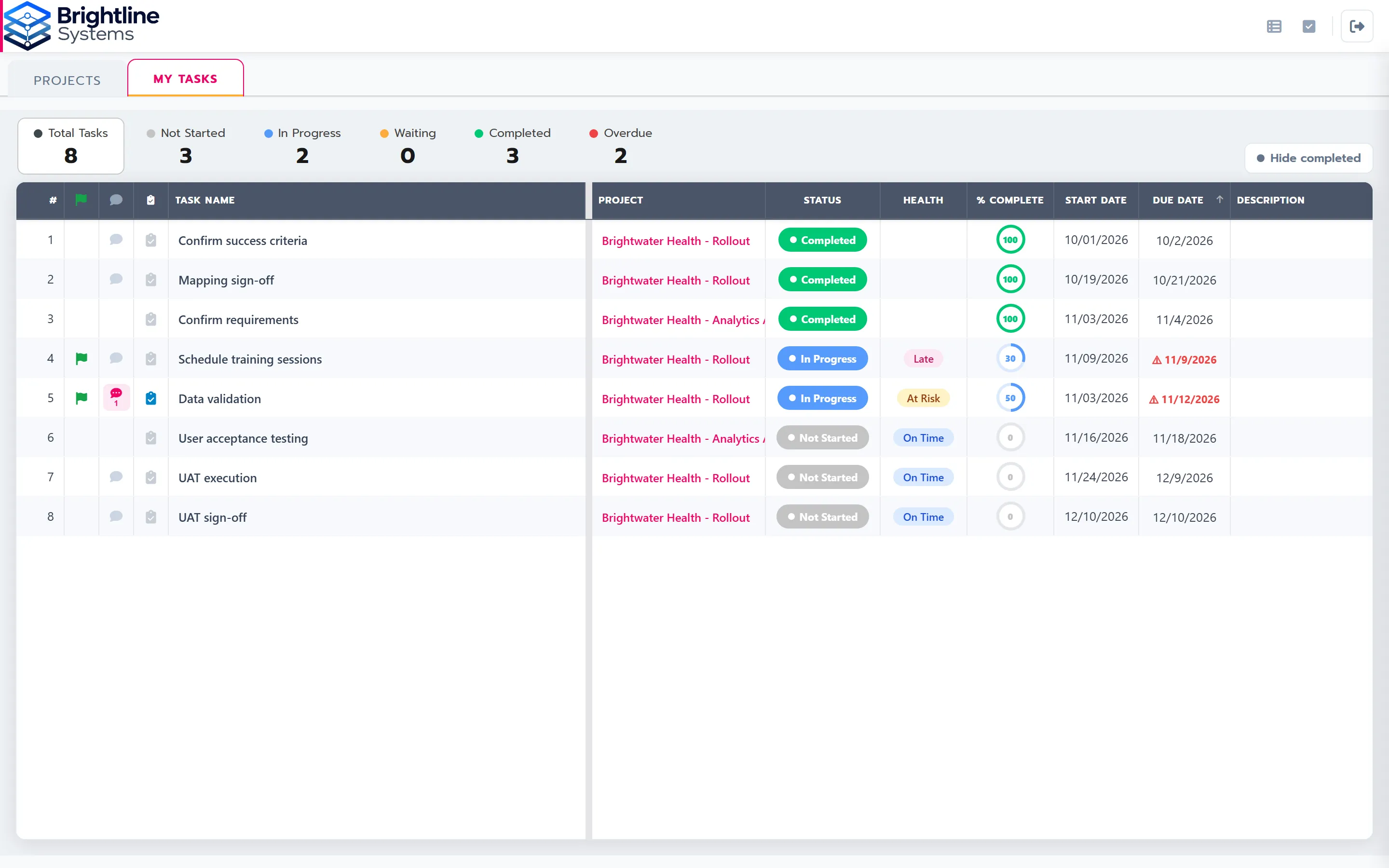
The client's My Tasks in the External Portal: 8 tasks across the two Brightwater Health projects with totals (3 not started, 2 in progress, 3 completed, 2 overdue), each task's project, status, health, percent complete and dates.
WHAT CHANGED

Five experiences, rebuilt for 2.0

Each of the four stakeholder tracks gets a place to work that fits how it works, from the modernized Project Gantt to the new Inspire Planner - External Portal 2.0. Every experience works from the same projects, tasks and resources in your Salesforce org.

Project Gantt Plan and reschedule
Task Console Execute across projects
External Portal 2.0 Bring clients in
Project Dashboard Status, already built
Portfolio Dashboard Every project, one view
Project Managers
Project Gantt

A modern Gantt for structured delivery.

Build the plan with phases, dependencies, milestones and baselines, then keep it realistic as work changes.

Drag to reschedule; dependent tasks move with it Baselines show how the plan has moved Start from a template or from what was sold on the Opportunity
Project Gantt for the Brightwater Health - Rollout project: phases and tasks with assigned team members, dependency lines, a milestone, baseline bars and today's date marked.
Team Members
Task Console

Every task, every project, one console.

Team members see the work assigned to them across every project, update it and log time without opening each project.

Grid, Kanban and calendar views of the same tasks Update status, effort and time in place One place to see what is due across every project
Task Console grid for team member Priya Shah: open tasks from five projects grouped by due date, with status, task health, progress and ready-to-start flags.
Clients & Partners New in 2.0
Inspire Planner - External Portal 2.0

Your customers, inside the plan.

Clients, partners and contractors see the tasks and schedule you share with them and update their own work. External Portal is included in the platform and hosted by Inspire Planner, so they do not need a Salesforce license.

Share selected projects and tasks, not your org External users update their own tasks Advanced External Collaboration adds External Portal Task Chat, External Portal File Sharing, External Portal Checklist Items, External Portal Custom Object Tabs and External Portal Login Branding Premium+
The client's My Tasks in the External Portal: 8 tasks across the two Brightwater Health projects with totals (3 not started, 2 in progress, 3 completed, 2 overdue), each task's project, status, health, percent complete and dates.
PMO & Executives
Project Dashboard

Open the project. The status report is already there.

Live health, progress, risk and budget for each project, built from the project data your team already keeps up to date.
Health, progress and milestones at a glance Risks and issues next to the schedule No status report to assemble
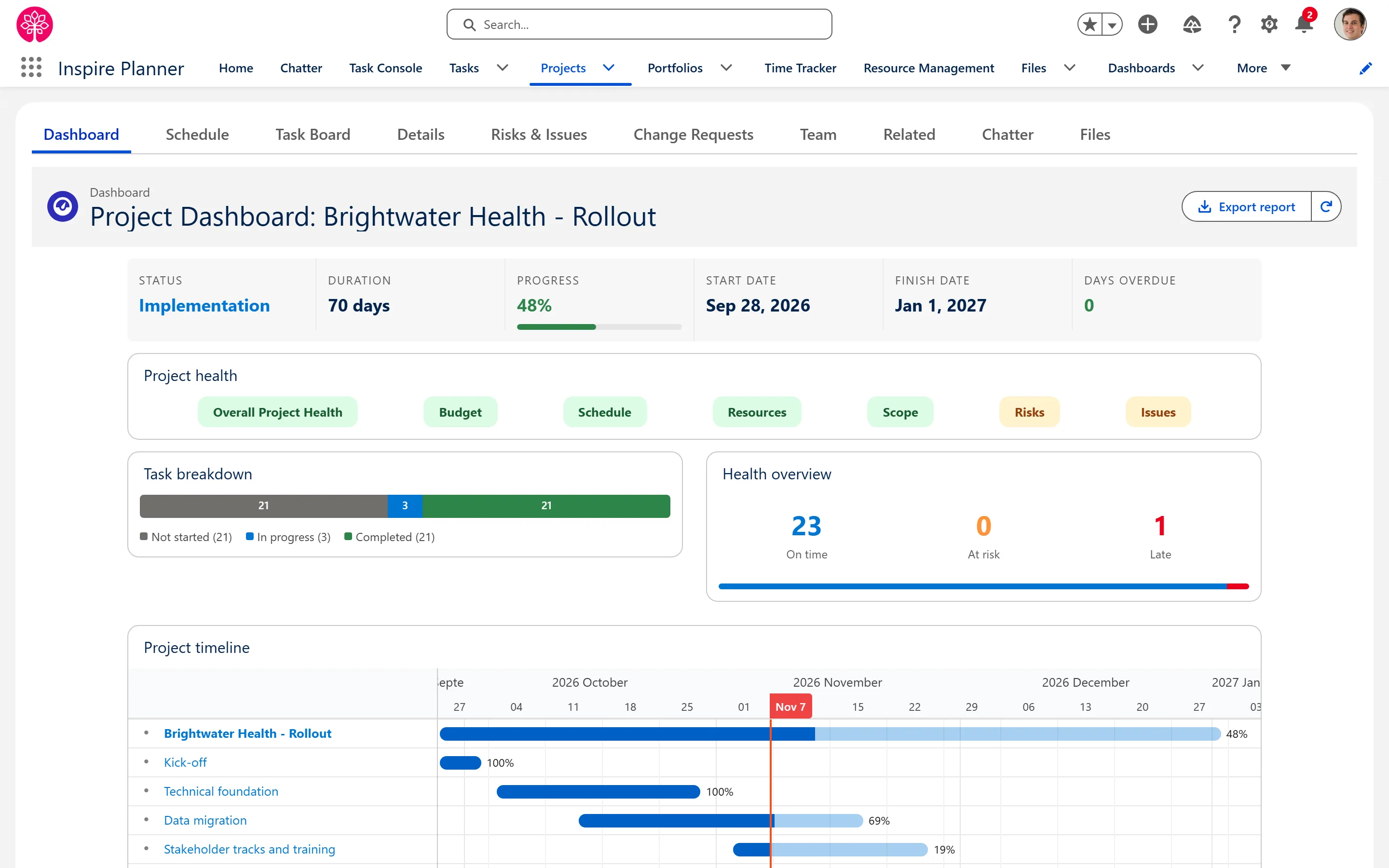
Project Dashboard for Brightwater Health - Rollout: status, duration and progress, health indicators with risks and issues flagged amber, task breakdown, health overview and the project timeline.
PMO & Executives
Portfolio Dashboard

Every project in your portfolio. One view of what needs attention.

Cross-project visibility for PMOs and leadership, built on Portfolios, so the conversation starts with the projects that need it.

Health across every project in a portfolio Dates, budget and progress side by side Drill from the portfolio into a project
Portfolio Dashboard for the Customer Implementations portfolio: 14 projects by status, budget used, and a health matrix of schedule, budget, risks, issues and progress for each project.
NOVEMBER 2026 MAJOR RELEASE

What arrives in November

New capabilities arrive switched off. Nothing changes in your org until you decide to turn it on.

New in 2.0 Template Console Create and manage your templates and their versions in one place. Available - Opt-in from the November 2026 Major Release.
Premium+ Advanced External Collaboration External Portal Task Chat, External Portal File Sharing, External Portal Checklist Items, External Portal Custom Object Tabs and External Portal Login Branding with your own domain.
See Premium+ and early access ›
HOW RELEASES WORK

Three Major Releases a year

Major Releases land in March, July and November, with Maintenance Releases between them. Every capability moves through the same stages, so you always know what is ready.

Private BETA Early validation with selected customers, by invitation.
Available - Opt-in Supported and switched off by default. Turn it on when you are ready.
Generally available Fully released and supported for every entitled customer.
FOR EXISTING CUSTOMERS

You are already on the platform

Inspire Planner 2.0 is the same managed package in your org, with new experiences built on it. You keep your contract, pricing and terms.

Your contract, pricing and terms stay as they are Your projects, templates and history are stored in your org Move from the legacy Visualforce Gantt to the Project Gantt with our Customer Success team Our Customer Success team plans the timing with you
A NOTE TO OUR CUSTOMERS

We continue to invest heavily in the Inspire Planner platform, and existing customers benefit from its continued evolution.

Your contract, pricing and terms stay as they are. Our Customer Success team will help you modernize to the Project Gantt, then activate the new experiences your team will use most.

Questions about Inspire Planner 2.0

Is Inspire Planner 2.0 a new product?

No. It is the same Salesforce-native platform, with new experiences for each stakeholder. Your data, configuration and history stay where they are.

Does 2.0 change our contract or pricing?

No. Existing customers keep their contracts, pricing and terms.

When do new capabilities reach our org?

With each Major Release in March, July and November. New capabilities arrive Available - Opt-in, so nothing changes until you turn it on.

How do we get early access to Private BETAs?

Private BETAs are by invitation, based on fit. Selected Private BETAs are a Premium+ benefit.

See Inspire Planner 2.0 for yourself.

A personalized walkthrough of the new experiences, in Salesforce.