
Project Governance: Salesforce project risk, issue and change management
Project risks, issues and changes on the record
Keep risks, issues and changes on the project they affect, visible to the people who need to act on them.
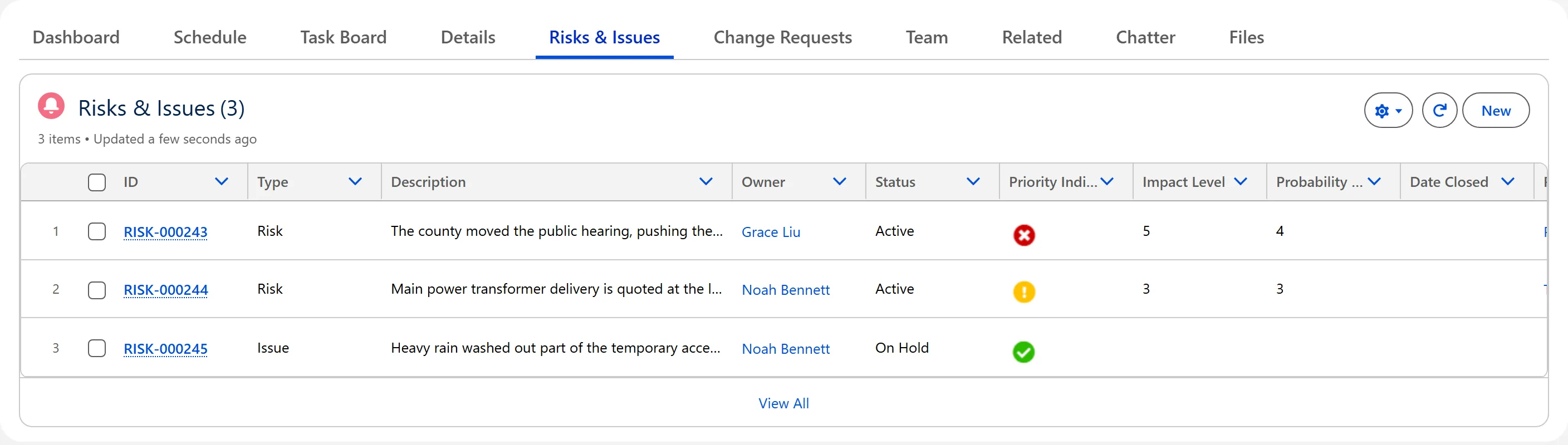
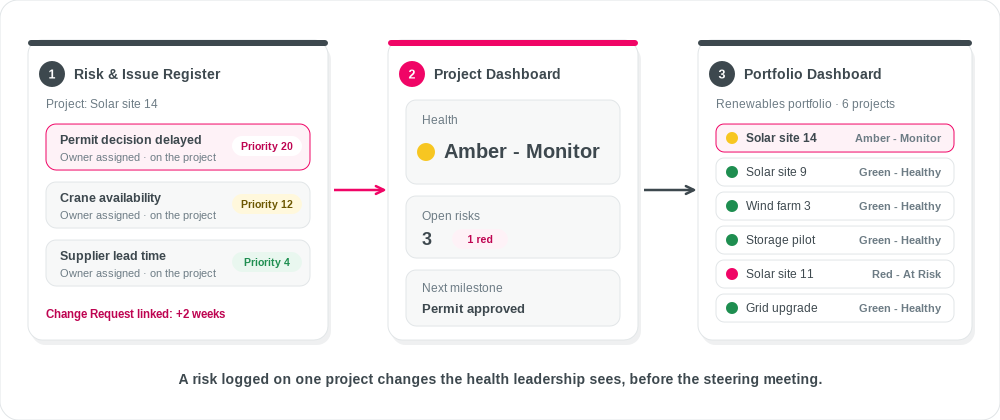
A risk logged on one project shows up where leadership looks
Risks, issues and change requests are records on the project, so the Project Dashboard and the Portfolio Dashboard reflect them as soon as they are logged.
Control should be part of delivery, not a separate report
A risk log kept in a spreadsheet sits apart from the plan and the people who need to act on it. Project Governance keeps risks, issues and changes on the project, and on the dashboards leadership already uses.
Inside Project Governance
Registers, change control and the views that surface them. Part of the platform for every customer.
Who uses Project Governance
Each role maps to a license type. See license types and pricing ›
Governance questions
Is governance a Premium+ feature?
No. The Risk & Issue Register and Change Requests are available to every customer.
Can executives see risks without editing the plan?
Yes. A Read-Only license gives sponsors the Project and Portfolio Dashboards, including risks and issues, without changing anything.
Are risks reportable in Salesforce?
Yes. Risks and issues are records in your org, so standard Salesforce reports and dashboards work on them.
What can a change request cover?
Changes to scope, dates or budget, recorded and decided on the project, so everyone can see what was agreed and when.
Can we see risks across all projects?
Yes. Portfolio Dashboard Risks shows risks across every project in a portfolio.
See a risk roll up to portfolio health.
Risks, issues and change requests on a project like yours, in Salesforce.